Don’t Ban AI; Make It the Co-Pilot for Every Student’s Genius Hour

Let’s start with the “Why.”

Why do we believe in Genius Hour? Why do we champion Project-Based Learning?

It’s not just to keep kids busy. It’s a rebellion against the industrial model of education. We believe that every student who walks into our classroom has a spark—a unique curiosity, a nascent passion, a question only they can ask.

The promise of Genius Hour is the promise of purpose. It’s an opportunity for students to work on something that matters to them, for an audience beyond their teacher. It’s the beautiful, messy, exhilarating work of turning wonder into something real.

But let’s be honest about the friction.

Every teacher who has run Genius Hour knows the hurdles. The student who stares at a blank page and sighs, “I don’t have any ideas.” The project that starts with a bang but fizzles into a shallow copy-paste from Wikipedia. The immense challenge of trying to mentor 30 unique, complex projects at once.

We believe in the “Why,” but the “How” can burn us out.

Now, a new tool has arrived. And most schools are asking the wrong question. They’re asking, “How do we stop students from cheating with AI?”

That’s a question born of fear. It’s a question about protecting the old system.

A better question—a remarkable question—is this: What if we gave every single student an AI co-pilot to supercharge their genius?

Instead of a threat, what if we saw AI as the single greatest tool ever invented to scale curiosity, deepen inquiry, and help students create remarkable work?

Here’s how it works. Think of AI not as an answer machine, but as a series of creative partners.

1. The Idea Catalyst: Killing the Blank Page

The hardest part is starting. AI is the ultimate brainstorming partner. It never gets tired and has no bad ideas.

  • The Problem: A student says, “I like video games, but I don’t know what to do for a project.”
  • The AI Co-Pilot Prompt (The Hook): “Act as a creative strategist. I’m a student who loves video games and history. Give me 10 project ideas that are not a simple report. They should combine game design, storytelling, and a historical event. One idea must involve building something.”
  • The Result: The blank page is gone. Now the student isn’t staring at a void; they’re making a choice. They’re in the driver’s seat.

2. The Research Sherpa: Escaping the Wikipedia Rut

Good projects are built on good questions. AI can help students learn to ask better questions and navigate the overwhelming sea of information.

  • The Problem: A student’s research is shallow, pulling only from the first page of Google.
  • The AI Co-Pilot Prompt (The Hook): “I’m researching the fall of the Roman Empire for my project. Act as a university professor. What are three common misconceptions people have about this topic? What are the names of two primary sources I should look for? Suggest one contrarian historian I should read.”
  • The Result: The student is no longer just finding information; they are interrogating it. They are learning to think critically and explore diverse perspectives, guided by their personal research assistant.

3. The Prototype Partner: From Idea to First Draft

Every creator knows the power of a prototype. It’s about making the idea tangible. AI can help students build that first version, turning a concept into something they can see and improve.

  • The Problem: A student has a great idea for an educational podcast or a short film but has no idea how to structure it.
  • The AI Co-Pilot Prompt (The Hook): “I want to create a 5-minute podcast episode for 5th graders about how black holes work. Generate a script outline with a catchy intro, a simple analogy to explain the concept, a fun fact, and a call to action for listeners to learn more.”
  • The Result: The student isn’t getting a finished product. They’re getting a scaffold. A starting point they can now argue with, rewrite, and make their own. It removes the intimidation of creation and invites them to start building.

This Changes the Teacher’s Job (For the Better)

When students have an AI co-pilot, the teacher is freed from being the source of all knowledge. Your job is no longer to have all the answers.

Your job is to become the Architect of Experience.

You are now the head coach, the lead questioner, the creative director. You can spend your time on the things that only a human can do:

  • Asking a student why this project matters to them.
  • Helping them navigate the frustration when their prototype fails.
  • Connecting them with a real-world audience for their work.
  • Fostering the resilience, empathy, and collaborative skills that AI can’t teach.

This is our opportunity to make a ruckus.

Let other schools install blockers and run plagiarism checkers. You can be the one to run the experiment. Start small. Pick one class. Pick five students. Give them permission to use their AI co-pilot and see what they create.

The future of learning isn’t about memorizing what a machine can already tell us. It’s about using these incredible new tools to do what humans do best: to dream, to inquire, to build, and to connect.

Let’s not just prepare our students for the future; let’s equip them with the tools to shape it.

This post was written with the help of Google Gemini 2.5 Pro.

Level Up Your Learning: How Gemini is Revolutionizing Education

The education landscape constantly evolves, and a new powerful tool is stepping into the classroom: Gemini, Google’s cutting-edge generative AI. This isn’t just another tech trend; Gemini offers many ways to enhance teaching and learning, benefiting educators and students. From streamlining administrative tasks to fostering personalized learning journeys, its potential is vast.

So, how exactly can Gemini be integrated into the educational sphere? Let’s explore at least five compelling examples:

1. Personalized Learning Companion and Tutor:

Imagine a student struggling with a complex math problem or a historical concept. Gemini can act as a 24/7 personal tutor, providing step-by-step explanations, breaking down difficult ideas into simpler terms, and even generating practice quizzes tailored to their specific needs. For students who are shy about asking questions in class, Gemini offers a safe space to explore topics at their own pace and receive immediate feedback. Advanced learners, too, can benefit by using Gemini to delve deeper into subjects and explore more challenging enrichment activities.

2. Supercharging Lesson Planning and Content Creation for Educators:

Teachers, rejoice! Gemini can be a significant time-saver and a source of fresh inspiration. It can assist in:

* Generating detailed lesson plans: Based on specific learning objectives, grade levels, and state standards.

* Creating supplemental materials: Think worksheets, engaging presentations (even suggesting scenes and scripts for videos!), discussion prompts, and varied assessment tools like quizzes.

* Differentiating instruction: Gemini can help adapt reading passages to various Lexile levels or generate diverse project ideas to cater to different learning styles and needs, including those of students with special education requirements or English language learners.

3. Empowering Student Research and Writing:

For students, Gemini can be a powerful research assistant. It can help:

* Summarize lengthy texts and research papers: Making it easier to grasp key information.

* Brainstorm ideas for projects and essays: Helping to overcome writer’s block.

* Provide writing support: By assisting with drafting, offering suggestions for improving clarity and style, and even helping to proofread.

* Gather information: Students can ask complex questions and receive comprehensive answers, and Gemini can often synthesize information from various sources.

4. Streamlining Administrative Tasks for Educators:

Beyond curriculum development, Gemini can help educators manage their workload more efficiently. It can:

* Summarize long email threads and draft replies.

* Assist in scheduling assignments and meetings.

* Help analyze data, for instance, from student performance or feedback.

* Draft grant proposals or letters of recommendation.

5. Fostering Creativity and Engagement in the Classroom:

Gemini’s capabilities extend to fostering a more dynamic and engaging learning environment. It can:

* Generate creative content: Such as stories, poems, or even scripts for class plays, sparking students’ imagination.

* Create interactive learning experiences: For example, by helping to design educational games or interactive quizzes.

* Assist in generating visuals: Creating images or suggesting ideas for visual aids to accompany lessons.

* Translate text: Breaking down language barriers and making learning materials accessible to a broader range of students.

The Broader Impact:

The integration of Gemini into education promises numerous benefits. It can lead to more personalized learning paths, increased student engagement, and valuable time savings for educators, allowing them to focus more on direct student interaction. Furthermore, familiarizing students with AI tools like Gemini helps prepare them for an increasingly AI-driven future workforce, equipping them with essential skills in critical evaluation, responsible technology use, and understanding AI’s capabilities and limitations.

A Note on Responsible Use:

While the potential of Gemini in education is exciting, it’s crucial to emphasize responsible AI use. Educators and students should be mindful of academic integrity, ensuring that AI is used to support learning and original thought, not to replace it. Fact-checking AI-generated content and understanding its limitations are also vital components of digital literacy in the age of AI.

Gemini is poised to be a transformative educational force, offering innovative ways to teach, learn, and collaborate. As this technology continues to evolve, its applications in the classroom will only expand, paving the way for a more dynamic, personalized, and efficient educational experience for all.

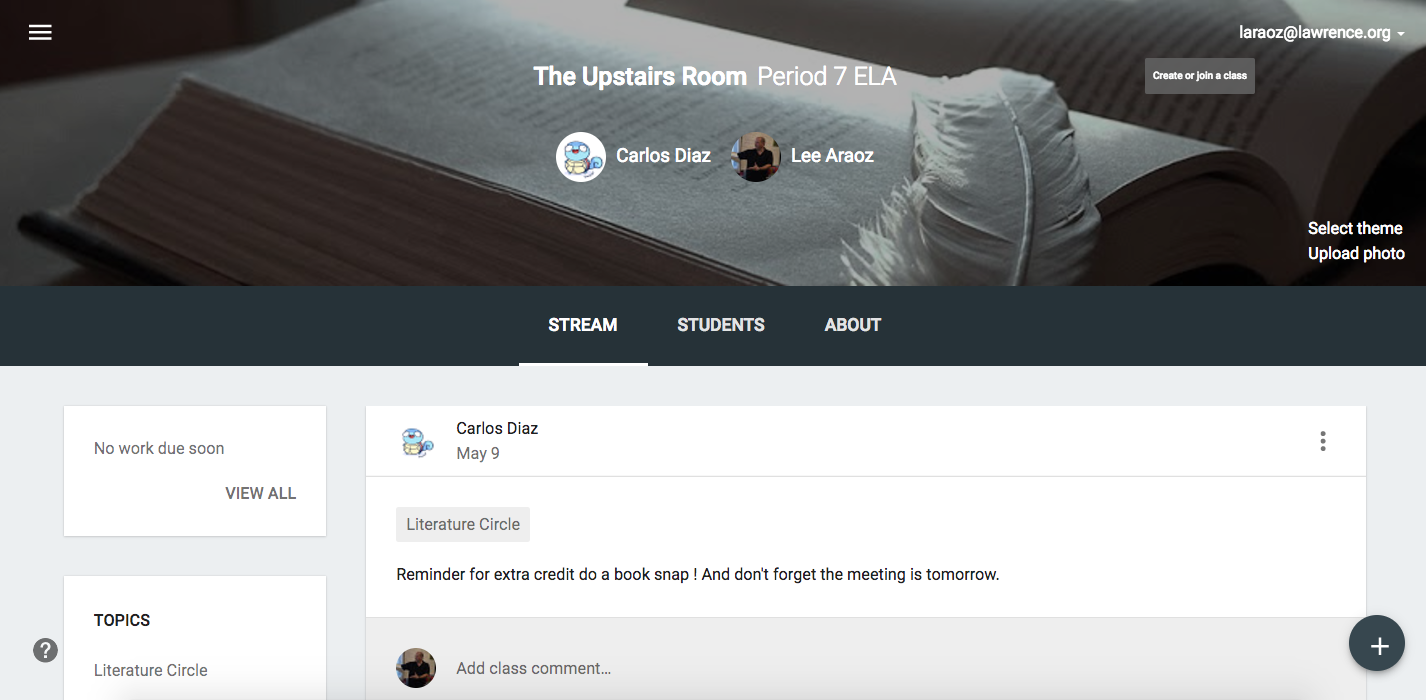
Student-Created Google Classroom Classes for Literature Circles

Google Classroom for Lit. Circles 2

Student voice and choice are critical components of the Literature Circle experience and these can be greatly enhanced with technology. In my 6th grade class, students are given multiple opportunities to make important choices that drive their learning process within the Literature Circle dynamic.

Four Elements of Choice in Literature Circles

  1. Book selection – Students choose the books they will read.
  2. Job assignments – Students decide which roles they will assume
  3. Chapters read – Students decide how much they will read for the next session.
  4. Digital platform used – Students decide which digital platform the group will utilize.

Google Classroom for Lit. Circles 1

Since they are very familiar with the Google Classroom platform (I’ve been using it all year), students created Google classroom classes for their Literature Circle book groups. I asked them to add me as a co-teacher so I can monitor the class stream for each group. In some groups, one student assumes the role of teacher for the week and then this position is rotated in addition to the roles in the Literature Circles. This allows students to submit digital evidence in the form of Google Docs, BookSnaps and/or any other application chosen. In other groups, all members join as “teachers” for their class. It’s totally up to the students!

Google Classroom for Lit. Circles 3

Students post reminders in the class stream and comment when necessary. School appropriate chat rules apply and individuals who don’t adhere to our code of conduct can be muted with their comments deleted if necessary.

Google Classroom for Lit. Circles 4

Students are encouraged to select and/or customize the class theme of their Literature Circle Google Classroom class. They can choose from the themes available in Classroom, or upload their own pictures. One group decided to change the class theme each week giving each group member an opportunity to choose it.

Google Classroom for Lit. Circles 5

Students post job assignments (with descriptions) to be completed for upcoming meetings. One group even found a Literature Circle job description document and added it to their class stream.

Google Classroom for Lit. Circles 6

Students post digital resources including links to Audiobooks and PDFs of their books so group members can complete assigned reading at home even if they leave their books in school. They are encouraged to use the digital tools and resources we’ve used in class throughout the school year. It’s amazing to see how easily they apply this knowledge!

Google Classroom for Lit. Circles 7

Do you want to know more about the plethora of digital tools that are available for Literature Circles?

iste_badge_presenter_2017

Join me in San Antonio at ISTE 2017 for the following BYOD session:

Screenshot 2017-02-18 08.29.12

Genius Hour 4.0 – Four Pathways to Genius

Genius Hour 4.0

“There exists empirical evidence proving that students who are given the freedom to explore areas based on their personal interests, and who are accompanied in their learning by a supportive, understanding facilitator, not only achieve superior academic results but also develop socially and grow personally.”

Renate Motschnig

It is imperative for teachers to provide opportunities for student voice and choice in the 21st-century classroom. If students have some control over what is covered, they’re more likely to stay tuned in and actively engage in the learning process. Thankfully, there’s a movement that promotes student choice and innovation in learning that has been sweeping the nation. This passion- driven movement, which is known as Genius Hour, or 20% Time, allows students to become innovative creators of content rather than just consumers of it

Selecting a Genius Hour topic is obviously of critical importance.  However, this is not always easy for students. They don’t always know or realize what they are interested in and what they want to inquire about. Thankfully, there are a number of excellent digital tools and resources that can be used to help students select a topic that will make Genius Hour one of the best projects they’ve ever done.

The video below by Jason Silva offers excellent brainstorming tips.

How to Find Your Passion

Students are encouraged to select one of the Four Pathways to Genius below as they begin their Genius Hour brainstorming sessions.


Screenshot 2017-04-01 13.37.51

  1. Create – You want to make/invent something new and share it.

  2. Change – You want to start a movement and make a difference in the world.

  3. Expert – You want to share something you are great at with the rest of the world.

  4. Inquiry You are curious about a topic and want to learn more about it.

    After students choose the pathway to genius they’d like to pursue, students are directed to come up with five essential questions to drive the research process. Since Genius Hour is an interdisciplinary project in our school, students are asked to come up with one essential question in each of the following subject areas:

    1. Mathematics
    2. Science
    3. Social Studies
    4. Student choice
    5. Student choice


    The remaining questions are the students’ choice and do not have to reflect a particular subject area.

    The key to crafting a good essential question is making sure it’s “un-Google-able”. This means the question cannot be easily answered by a quick Google search. This can be quite challenging for students at first and teachers need to plan accordingly. Some students need more assistance with this than others and a key factor for success is making sure you check in with students on a regular basis. They should not be able to begin the research process until their essential questions have been checked and revised if necessary. We encourage our students to conference with a peer before submitting their essential questions to the teacher for review.
    Students are now ready to begin researching their Genius Hour topics using their essential questions to drive the process.

Do you want to learn more about Genius Hour 4.0?

Click the image below to access my Genius Hour Resources page. 

Genius Hour Resources Pic

Click the links below to register for my online in-service or graduate course.

Genius Hour: Passion-Based, Technology-Infused PD/In-Service Course

EDCI 639-009  Genius Hour: Passion-Based, Technology-Infused Learning in the Classroom

screenshot-2017-02-14-09-36-07

The 50-50 Rule of Technology Integration

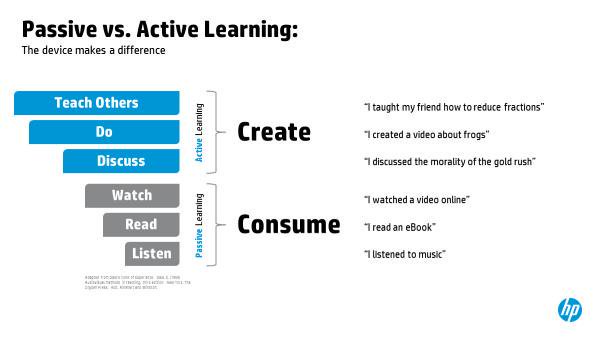
Technology, when used to create content and connect students with authentic audiences, empowers learners and prepares them for jobs that don’t even exist yet. It is critical for schools to facilitate and promote a culture of content creation. Educators that teach students how to use tech tools to actively create content are EMPOWERING these learners by giving them the skills, strategies, and experiences they’ll need as they move into the future.

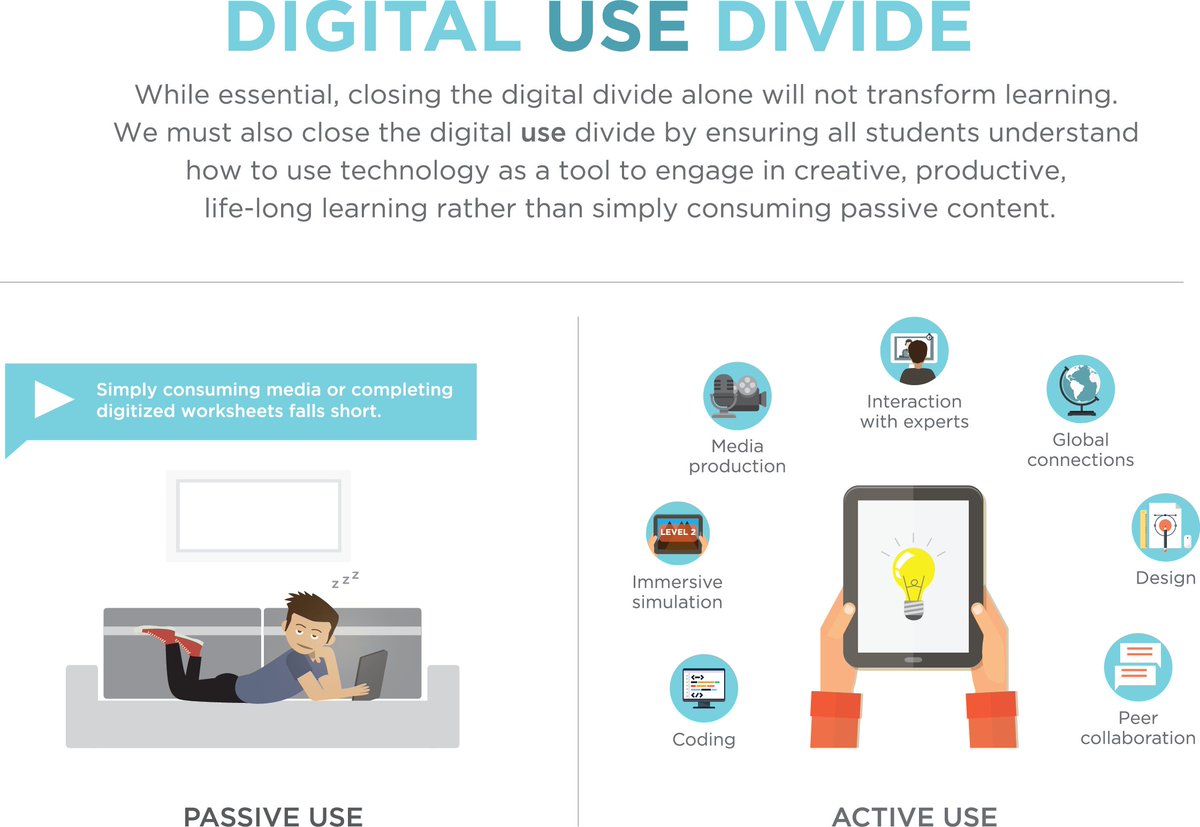
To begin, schools must work to create an equal balance of content consumption and content creation in their classrooms. Too many school systems have spent millions of dollars to equip students and teachers with the latest tech tools only to utilize them in the wrong ways.

CzHzjZZUUAAd_0B

Rows of silent students completing digital worksheets on their Chromebooks or iPads is not what one would call effective technology integration.  The digital use divide between passive consumption and active creation must be closed!

Cz4ZVAWUUAIu3Mm

Teachers in classrooms should subscribe to the 50-50 Rule of technology integration. If students CONSUME content in the classroom for 25 minutes, they then need to CREATE content for the same amount of time in that classroom. For example, if I direct my students to passively consume content by completing assignments in Castle Learning, IXL or ReadWorks Digital, I must allow them to spend the same amount of time creating content using their devices.

DCCTMljUAAAvcEc.jpg-large

This can be done in a variety of innovative ways including creating How-To Videos for Genius Hour projects, making Google Slides presentations for Iron Chef Jigsaw lessons or writing a new post for the class blog. It’s very important to strike this balance between consumption of content and creation of content on a regular basis. It could also include students putting tech devices away for the remainder of the class and making something in a Makerspace-like environment.

screenshot-2016-11-23-07-42-59

What do you think about the 50-50 Rule of Technology Integration? Would you suggest a different ratio? Please write a reply in the comment section at the end of this post.

screenshot-2017-02-14-09-36-07
iste_badge_presenter_2017

Fear vs. Exhilaration

bvforuh-jpg

Fear = I don’t know if I should share/try/deploy this new tech tool/teaching strategy/business model. It could fail catastrophically!

Exhilaration = I can’t wait to try this out with my students/teachers/employees. This is going to make things so much better!

I used to worry about sharing my work here on this blog and on social media. I was afraid that someone would “steal” my stuff. I imagined that another educator would scoop up my idea and claim it as their own in an article, a book or a tweet. But then I read Steal Like an Artist and Show Your Work by Austin Kleon and my mindset was TRANSFORMED!

Mr. Kleon writes that you don’t have to be a genius (I’m definitely not) to share your work. He claims that we should make an effort to share something small every day emphasizing that you can’t find your voice if you don’t use it. Kleon also states that you should stick around and not give up so easily. It takes time to build a following and those of us who have continued to share, post and tweet are reaping the benefits of establishing and maintaining a vibrant PLN (Personal Learning Network).

This quote has inspired me to transform my fear into exhilaration and I plan to reflect on it when the “worry whispers” begin to create feelings of anxiety and doubt.

Going Google in the Classroom

Google For Education is one of the fastest growing learning tools in the world. This past September, our school district enrolled in this suite of free tools for classroom productivity and collaboration. This amazing collection of applications is an excellent resource for educators of all grade levels in all subject and specialty areas. With GAFE, teachers can engage students anytime, anywhere on any device with the following free, device-agnostic, teacher-approved tools:

Google Drive

Google Docs

Google Slides

Google Forms

Google Sheets

Google MyMaps

Google Classroom

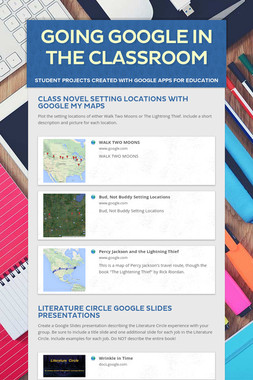
Click the image to view examples of student projects created with Google Apps for Education.

56ed53c14060372f671cc4ad-screenshot-medium-4

Don’t Accept The Default: Suggestions to Ensure Success in Teaching

This post is part of a speech I gave for the Kappa Delta Pi Induction Ceremony at Molloy College on March 14, 2016.

I originally compiled this list of statements to offer new teachers advice as they entered their first year of teaching. However, many of the members in my PLN have reminded me that these suggestions have value for all teachers regardless of their years of experience in the classroom.

Sage on the StagetoGuide on the Side-2

  1. Don’t accept the DEFAULT, seek out an option that will be BETTER for students:
  • ALWAYS find a BETTER way!
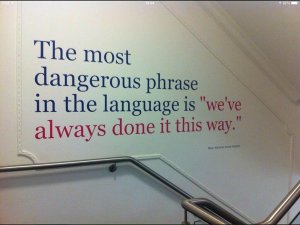
  • Make it your mission to fight “We’ve always done it this way” thinking.

Cavdkg2UMAEeC6p

  • Be a disruptor and shake things up. Create an epic classroom!

CefzlDXW4AAoI4j.jpg-large

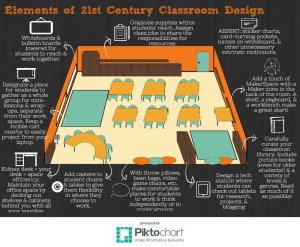
  • Classroom design EMPOWERS students. NO more ROWS of desks!

cnb1njywcaaqvgs-jpg-large

  • Create the change you wish to see in your school.

the-masters-have-spoken-13-inspirational-personal-branding-quotes-8-638

2.  Be so GOOD they can’t ignore you:

  • Do MORE than the default – Arrive early and stay late.
  • Create your OWN lesson content – Ditch the textbooks and worksheets.
  • Be AVAILABLE during your lunch hour – Hold review sessions, play board games with students, treat them to lunch occasionally and allow them to work on projects.
  • Volunteer for everything – Start a drama club, be a student government advisor, go to PTA meetings, and/or join the site-based management team.
  • Read Cal Newport’s book, So Good They Can’t Ignore You for more inspiration.

3.  Establish a strong PERSONAL CONNECTION with your students:

  • My college professors told me, “Don’t smile until Christmas.” This is total bullshit! Laugh with your students, give them high-fives, jump on your desk to make a point, and above all show students that learning is FUN.
  • Share family stories with your class – Include your spouse, your children, and your pets. Describe how things were in school when you were a kid.
  • Share your writing folder – Read stories you wrote when you were their age. Show them your horrible handwriting.
  • Get to know your students – Provide ample opportunities for them to share verbally and in writing – start a class blog. Go to your students’ soccer games, dance recitals and drama shows. They will never forget this!

The-Gong-Show

4.  Be FIRM, FAIR, FLEXIBLE and FUN:

  • Establish clear and simple standards of behavior and stick to them. Students need to feel loved, and they all want limits (although they may not realize it).
  •  Flexibility is a key factor to success in your first year. Every student is not at the same instructional level and has different social and emotional needs. For example, I had a student in my first class who was a genius. He absorbed knowledge like a sponge, but his desk was a mess inside and out. Rather than scold him repeatedly about his disorganization, I allowed him to “take over” an empty desk next to him so that he would have more room to put his things.

DEIiQ_DV0AAuR3x

  • Be a KID!! Alicia, a student in my first class, made this card for me in 1989. She thanked me “for being a teacher and a kid at the same time.” I try to remember this when I get overwhelmed with state mandated assessments and curriculum.
  • “I’ll never forget the FUN I had in 5th grade. My teacher, Mrs. Weiner, made each learning task a joyful experience. We played game shows like Password to review material, created our own videos and filmstrips (cutting-edge technology in the 1970’s), wrote extensively and read voraciously. We participated in a Gong Show talent contest, dressed up as our favorite book character and played kickball in her class. Content was being created on a daily basis and it made for an unforgettable experience. I credit Mrs. Weiner as a primary influence on my desire to become a teacher. And I’ve made sure to incorporate fun activities like these into my lessons every year regardless of grade level. My students come back to tell me how they will always remember the Ancient History News programs they created and filmed live in front of the class.
  • Take the ‘EW’ out of REVIEW with Game-Based Learning applications like Kahoot! and Quizlet Live.

Continuum of Choice

5.  Make a daily effort to be a “GUIDE ON THE RIDE” rather than a “Sage on the Stage.”

  • Move from a teacher-centered to a LEARNER-DRIVEN classroom.
  • Plan group work activities into every lesson – Play Breakout EDU!
  • Allow students to explore curiously and innovate.  – Do passion-based, student-directed Genius Hour projects.

Adobe Spark

  • Incorporate student CHOICE into most learning tasks – Think-Tac-Toe.

tic tac toe

6.  DIFFERENTIATE:

  • Assess prior knowledge as soon as the lesson begins with Socrative, Nearpod, Padlet, Poll Everywhere, Google Forms or plain old pencil and paper.
  • Then group students accordingly for that lesson (Flexible Skills Grouping).
  • Offer multiple project options for students to create evidence of learning. Be sure to include choices that reflect various learning styles. Refrain from assigning “cookie-cutter” projects where every student creates the same exact thing.

classroom walk

7.  Get students MOVING in the classroom.

  • Take your class on “Learning Walks” inside AND outside the school building.
  • Switch up the seats and your classroom configuration often.
  • Use GoNoodle, a fun, interactive way to get kids moving.
  • Don’t spend more than 30 minutes at a time engaging in seat work.

imrs.php

8.  Don’t overwhelm students with too much homework:

  • HW takes the joy out of learning for many kids.
  • “There is no evidence that any amount of HW improves the academic performance of elementary students.” Harris Cooper of Duke University
  • Families across America battle over HW nightly. Parents nag, cajole and often end up doing assignments for their children.

Create a Digital Tattoo

9. Establish a POSITIVE and PROFESSIONAL digital presence for yourself and your class:

  • Understand that your digital tattoo is permanent and you have total control over the content you put out there. So keep it positive!
  • Provide multiple pathways for students and parents to remotely access learning materials outside the classroom.
  • Create a class website/digital flyer with a web-based app like SMORE.
  • Model and demonstrate that “Learning Doesn’t Stop at 3 O’Clock.”

It's ok to date new technology

10. Don’t try to keep up with EVERYTHING in education technology:

  • You can’t, nobody can.
  • Curate your resources for quick and easy access using tools like: Padlet, Pearltrees, Pintrest, Smore or Symbaloo.
  • Ask your students what’s new in technology and social media.
  • Test-drive a new tech tool this year.

569416c64060373ddbfbabcd-screenshot-medium-3

11.  Foster a GROWTH MINDSET in your students:

  • Teach students that failure is an important part of learning.
  • Promote the power of positive self-talk. Change your words; Change your mindset.
  • Give examples of famous people who failed multiple times before achieving success.IMG_4783 For example, Walt Disney, Albert Einstein, Abraham Lincoln, and Michael Jordan all overcame many obstacles before becoming famous.

Michelangelo_I_am_still_learning_9buz

12.  Don’t EVER stop learning:

  • Embark on self-directed, passion-based professional development.
  • Curate and share content with colleagues.
  • Listen to podcasts, view webinars, and READ whatever you can get your hands on.
  • Become and expert in your field at your own blistering speed. “The standard pace is for chumps.” Kimo Williams


13.  GET connected:

  • Discover the VIBRANT community of AMAZING educators on Twitter. Follow #edchat hashtags! This has been a true GAME-CHANGER for me! I’ve learned more on Twitter in a few months than in years of traditional PD.
  • Grow your PLN (Personal/Professional Learning Network).
  • Go to Edcamps, conferences and workshops (the topic matters less than the people you connect with).

TWT-Share-Your-Work

14.  SHARE your WORK:

  • Brag about your lessons, your students and your school on social media.
  • Use apps like Remind to send home positive messages and pictures of students in action.
  • Create a class blog, a digital newsletter or a YouTube channel to spread the word.
  • Don’t hold back because you worry that it’s not good enough or original enough. “To be original, you don’t have to be FIRST, you just have to be DIFFERENT and BETTER.” ~Adam Grant
  • As a teacher in the new millennium, you are your own personal brand. Therefore, it’s in your best interest to promote yourself.
  • Read Austin Kleon’s book, Show Your Work for more inspiration.

564f966c40603741d37ca4f3-screenshot-medium-2

15.  Save EVERYTHING:

  • Keep a teaching journal and or blog about your successes and failures in the classroom.
  • Take pictures, make “Best of” slide shows, and share your work.
  • Keep a digital portfolio of everything you do with your students.
  • Digitize your resume using an app like Smore and continually update it.


I’d like to emphasize that teaching is a difficult job, but it’s the MOST REWARDING profession there is. I had a friend who owned his own business and he asked, “Isn’t it boring teaching the same grade/subject each and every year?” and my immediate response was, “No, it NEVER gets boring because each year you are challenged with a new and vastly different  group of students.”

EMBRACE CHANGE and you will rarely be disappointed!

iste_badge_presenter_2017


Teachers on Twitter

Passionate educators pushing the envelope

Lifelong learners honing their craft

Changing the world one tweet at a time

Expanding, enhancing, growing.


Riding the hashtags of

#weekly edchats

participant-led #edcamps,

#conferences, and #workshops.


Meeting like-minded teachers from all over the globe

Expanding their PLNs

digitally collaborating

GROWING exponentially.


Always learning

24/7/365

Personalized PD

“The best I’ve ever had!”


Dedicated professionals

committed to their students

Finding new ways to teach

sharing what works and what doesn’t.


Empowered educators

tweeting about their students, their colleagues, their schools

creating good content

Bragging about their work!


CONNECTING their students with

awesome authors,

wise experts,

and their peers across the world.


Gaining inspiration

from teachers, admins and ed leaders

Passion-driven, teacher-directed

Learning in its purest form.


JOIN US!

@LeeAraoz

Instructional Coaches Make a Huge Impact

Instructional coaches are the unsung heroes of the education profession. They nimbly navigate the line between administrator and teacher as they strive to make an impact across multiple grade levels and school sites. Instructional coaches have a unique vantage point – they see things happening at the ground level and are able to offer a perspective that few educators have.

CVQDABbUkAAqOBa

One of the biggest issues confronting schools today is how to provide continuous, high-quality professional development to teachers and staff. District budgets are not what they used to be and education leaders must come up with creative and cost-effective ways to continue to provide this level of training in their schools. One innovative way of doing this is to create the role of an instructional coach in their district by hiring a teacher leader from within. Many districts call these specialists TOSAs (Teachers On Special Assignment). Other districts call them coordinators, but they serve the same purpose: providing perpetual PD in a non-evaluative, non-judgemental environment. These “thought partners” work collaboratively with teachers by asking them what they need and showing them how it can be deployed.

My Instructional Coaches Quote

Instructional Coaches/TOSAs do many awesome things. These include, but are not limited to, the following:

  1. Provide job-embedded professional development.
  2. Model and demonstrate highly-effective best practices.
  3. Offer non-evaluative, objective feedback on a regular basis.
  4. Create an environment where student needs drive professional development.
  5. Offer guidance and feedback at the exact time teachers need it most – in the classroom.
  6. Inspire teachers to try new learning strategies and tools.
  7. Facilitate the transition from teacher-centered to learner-driven classrooms.
  8. Are site-based teacher leaders who support both students and their teachers.
  9. Collaborate with teachers in order to engage students in innovative ways.
  10. Help to close the digital use divide by ensuring that all students understand how to use technology to create content.


Click the image below to view my Instructional Coaches Smore digital flyer which includes links to a collection of resources I’ve curated. 

565a74dc4060377a53b41b2d-screenshot-medium-4